Elementor 3.32 is here, and it brings several upgrades that make design faster, smoother, and more powerful. If you build WordPress websites with Elementor, this release adds features that make both design and workflow easier to manage.
This update continues the “Editor V4” journey and introduces fresh design controls, stronger performance, and accessibility improvements. Let’s take a detailed look at what’s new, why it matters, and how you can take advantage of it.
Highlights of the Update
Elementor 3.32 adds a range of features focused on creativity, consistency, and performance.
Key features include:
- Transform controls for moving, scaling, rotating, and skewing elements in 2D and 3D
- Transition settings for smoother animations between hover or focus states
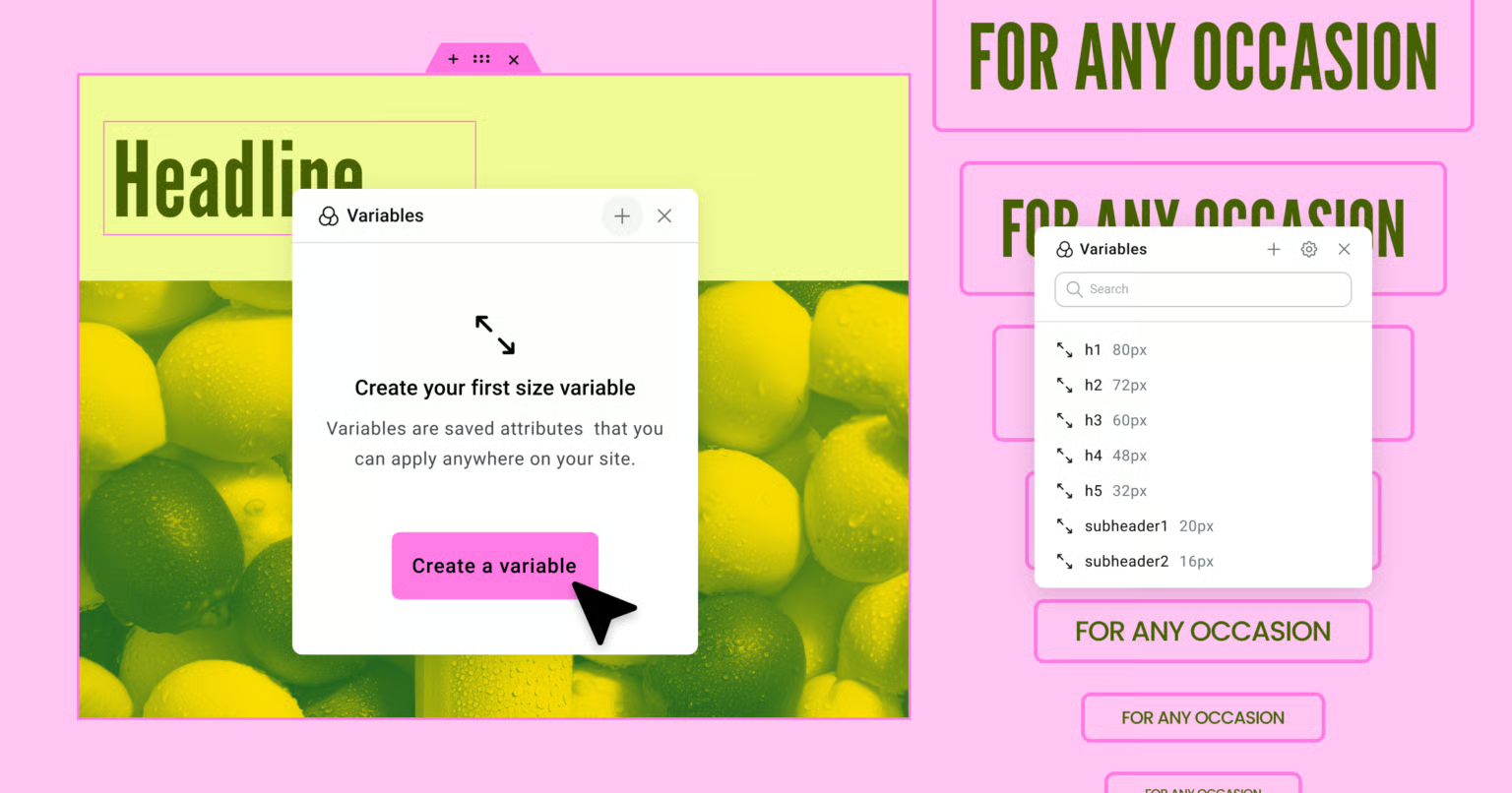
- Size variables (Pro) for consistent spacing and sizing across your design system
- Improved class management for cleaner CSS and reusable design elements
- Optimized performance, caching, and accessibility updates
- Continued groundwork for the next generation of the Elementor editor
Transform and Transition Controls
One of the most exciting additions is the new Transform panel. You can now move, scale, rotate, or skew elements directly inside the Elementor interface. It supports both 2D and 3D transformations, meaning you can create depth and movement without custom CSS.
When combined with transitions, these effects can bring pages to life. Imagine cards that gently rotate on hover, buttons that scale on click, or images that shift slightly for a subtle parallax feel. The transition settings let you control duration, easing, and which properties animate.
These enhancements encourage more creative interaction design while keeping everything inside the visual editor. They also respect reduced-motion preferences on users’ devices, which improves accessibility for visitors who prefer limited movement.
Size Variables and Consistent Design
For those using Elementor Pro, size variables are a big leap toward better design system control. You can now create reusable size tokens for spacing, padding, and typography. For example, define “small,” “medium,” and “large” spacing once, and then apply them site-wide. When you later adjust one variable, all related elements update automatically.
This saves time, reduces manual edits, and keeps layouts consistent across pages. For teams or recurring client projects, it helps maintain a professional, unified style.
Class Management Improvements
Class management has been refined to make CSS organization easier. You can now search, filter, and clean up unused or empty classes. Local classes can be converted into global ones, making it easier to reuse styles across multiple widgets or pages.
By using reusable class names, you’ll avoid style duplication and keep your CSS lighter. A smaller, more organized stylesheet not only loads faster but also makes long-term maintenance easier.
Performance and Accessibility Enhancements
Elementor 3.32 isn’t just about new design options. It also improves speed and usability behind the scenes.
Here’s what changed:
- Element caching is now part of the core, reducing how often the system needs to rebuild the same elements.
- Optimized markup is enabled by default for new installations, minimizing unnecessary wrappers and reducing the DOM size.
- PHP 8.4 support ensures compatibility with the latest server technologies and fewer deprecation issues.
- Accessibility updates remove decorative icons from assistive technology and make animations respect system preferences for reduced motion.
These updates mean faster page loads, fewer compatibility issues, and a smoother editing experience overall. For SEO-focused sites, reduced DOM weight and faster rendering can positively impact search rankings and user engagement.
Practical Ways to Use These New Features
If you’re ready to experiment with Elementor 3.32, here are some practical ways to apply the new features in real projects.
- Update in a staging environment first
Test everything before updating a live site. Some third-party addons might not be fully compatible with the new editor. - Add motion wisely
Use the new transform and transition controls for subtle interactions. A little motion goes a long way. Keep it simple to maintain smooth performance on mobile. - Set up a variable system
Define size variables for consistent spacing and typography. This allows you to control design scale globally instead of adjusting individual widgets. - Audit and clean CSS classes
Use the class manager to remove old, unused classes. Convert frequently used local classes into global ones to reduce redundancy and create a cleaner design structure. - Measure site performance after upgrading
Use tools like Google PageSpeed Insights or Lighthouse to compare before-and-after scores. Check for layout shifts, large images, or render delays. - Review accessibility and animation preferences
Ensure that your animations respect user preferences and that important elements remain visible to screen readers.
Things to Watch Out For
Before applying the update to client or production websites, keep these points in mind:
- Some features are still experimental as Elementor continues rolling out the Editor V4 framework. Always back up your site first.
- Theme or plugin conflicts might appear, especially with those relying on older Elementor markup. Test carefully after upgrading.
- Too many animations can harm user experience and page speed. Focus on enhancing usability rather than adding decoration.
- If your site uses dynamic content or conditional displays, test them thoroughly because element caching may affect how frequently content updates.
- Confirm PHP compatibility with your hosting before switching to newer versions like 8.4.
Real-World Examples
Portfolio card hover effect:
Designers can create 3D card interactions. Use the Transform tool to slightly rotate a project card on hover, apply a smooth transition of around 300 milliseconds, and watch your portfolio come alive without custom CSS.
Consistent spacing system:
Create site-wide spacing variables such as small = 8 px, medium = 16 px, large = 24 px. Apply these values throughout containers and widgets. When you later decide to increase spacing, update the variable once and every section adjusts automatically.
Cleaning old CSS:
If a website has been edited many times, you probably have leftover classes that aren’t doing anything. With the new class tools, identify unused styles and delete them. This helps improve site speed and keeps your codebase clean.
Accessibility tuning:
If you design for a blog or business website, make sure icons that are decorative only are hidden from screen readers. Test with a browser that supports reduced motion and confirm that animations pause correctly for users who prefer that setting.
Why This Update Matters for Developers and Site Builders
Elementor is moving closer to becoming a full design system inside WordPress. The combination of design variables, reusable classes, and better performance makes it a stronger professional tool.
For developers, it means fewer workarounds and custom CSS snippets. You can achieve complex layouts directly in the builder while keeping code lighter. For site owners, it brings more stable updates and faster load times.
For anyone focusing on optimization or security, Elementor 3.32 offers a cleaner framework that’s easier to maintain. Reduced markup and caching improvements lower server strain, which helps keep sites responsive even under heavy traffic.
This release also signals Elementor’s future direction—more design power built into the interface, more speed under the hood, and better long-term scalability for professional web projects.
Pre-Upgrade Checklist
Before you update, review this short checklist to avoid issues:
- Backup the full website, including the database.
- Update Elementor on a staging site first.
- Make sure your WordPress theme and all plugins are updated.
- Confirm your hosting environment supports PHP 8.4 or at least PHP 8.1.
- Clear all caches after updating.
- Check for any console errors or layout issues in both the editor and live site.
- Review major pages for spacing, animations, and mobile layout.
- Audit CSS classes and remove duplicates.
- Validate accessibility using browser DevTools or an online checker.
- When everything works as expected, deploy to the live site.
Final Thoughts
Elementor 3.32 may look like a routine update, but it introduces important changes that move the builder toward a modern, design-system-driven future. With transforms, transitions, size variables, and stronger class management, you have more creative freedom while maintaining consistency.
Performance and accessibility updates round out this release, making it one of the most balanced upgrades Elementor has released in recent months. Whether you manage client websites, run your own projects, or focus on WordPress optimization, this version gives you tools to design smarter, faster, and cleaner.
Explore the new features on a staging site, test your workflows, and see how they improve your build process. Once you’re confident everything runs smoothly, roll it out across your projects and enjoy the new possibilities Elementor 3.32 offers.